
Free browser tool
ICS file opener: open an .ics file in your browser
An .ics file is a plain-text calendar file, and you can open it right here: choose the file and read its events in this tab without uploading it. Apple Calendar, Google Calendar and Outlook can also open it. When a file will not open, the cause is usually a file association, a .txt extension or a subscription link.
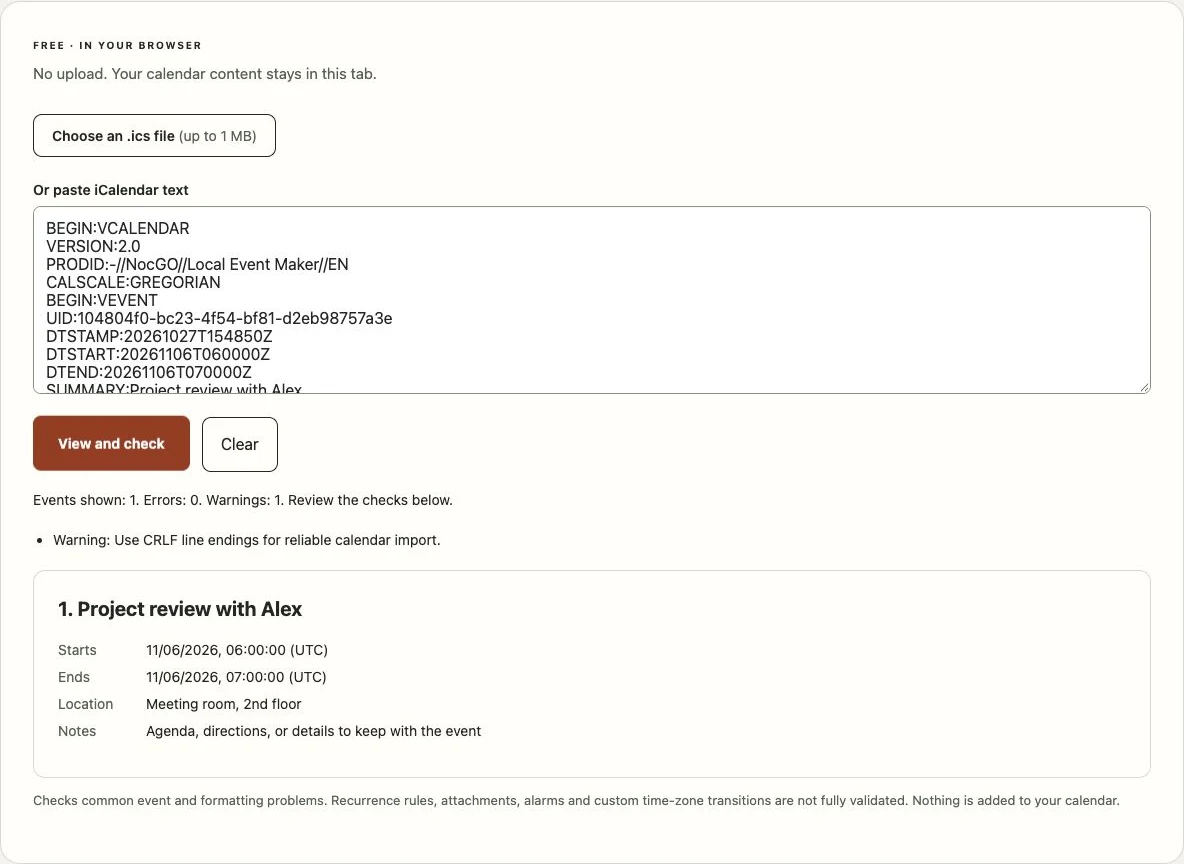
No upload. Your calendar content stays in this tab.
Choose a file or paste its contents to see the events.
Checks common event and formatting problems. Recurrence rules, attachments, alarms and custom time-zone transitions are not fully validated. Nothing is added to your calendar.
How to open an .ics file in your browser
- Choose the .ics file above, or paste its text into the box. Files up to 1 MB are read in this tab and are never sent to a server.
- Select View and check. Each event shows its title, start, end, location and notes, followed by any errors or warnings the checker found.
- Compare the dates with the original invitation before adding anything. Time-zone handling is the most common reason an event lands at the wrong hour.
What opens an .ics file? Choose your platform
Every major calendar reads the iCalendar format, so the question is which route your device offers. The tool above works on all of them because it only needs a browser. The sections below cover what happens when you double-click or tap the file instead.
Windows
On a computer with Outlook installed, double-clicking an .ics file usually opens it in Outlook, which offers to save the event. Without a calendar app associated with the extension, Windows asks which app to use or opens the file in Notepad. Either way you can recover: right-click the file, choose Open with and pick your calendar, or read it in the tool on this page.
Mac
On macOS the Calendar app is associated with .ics files. Double-clicking one normally opens Calendar and asks which calendar should receive the events. You can also use File and then Import inside Calendar. If the file describes a subscription rather than individual events, add the address as a calendar subscription instead.
iPhone and iPad
Apple documents adding events from an .ics attachment in Apple Mail. Files opened from Safari or the Files app may only show a preview without an Add control. The open ICS file on iPhone guide walks through the Mail, Safari and Files paths separately, including what to do when no Add button appears.
Android
There is no universal double-click equivalent. Google Calendar documents importing files through calendar.google.com on a computer, under Settings and then Import and export. The event then syncs to the phone. Some manufacturers’ calendar apps can open an .ics file directly, so try tapping it first.
Open an ICS file without Outlook
Outlook is one option, never a requirement. The file format is an open standard, RFC 5545, and many apps read it.
- Browser: use the tool on this page. Nothing is installed or uploaded.
- Apple Calendar: double-click on a Mac, or open the attachment in Mail on iPhone.
- Google Calendar: import the file from a computer and let it sync.
- A text editor: an .ics file is plain text, so Notepad or TextEdit can show it. That is enough when you only need one date or address.
Why an .ics file won’t open
It was saved as .txt or .ics.txt
Windows hides file extensions by default, so a file named meeting.ics.txt can look like meeting.ics. Turn on file name extensions in File Explorer’s View menu, then rename the file so that it ends in .ics only. If the contents start with HTML instead of BEGIN:VCALENDAR, the download was an error page; ask the sender for the file again.
It is a subscription link, not a file
An address that starts with webcal://, or a web link to a live calendar feed, is a subscription. Saving that address does not create a valid calendar file. Paste it into your calendar’s subscribe or add-by-URL option instead. The tool on this page reads files and pasted text; it does not fetch subscription addresses.
The times are wrong after opening
An .ics file can state a time in three ways. DTSTART:20261106T060000Z ends in Z and means UTC, which your calendar converts to local time. DTSTART;TZID=Europe/Berlin:20261106T070000 is a local time in a named zone; if the receiving calendar does not recognise that zone, it may place the event at the wrong hour. A time with neither is floating, and each app decides where it belongs. All-day events use VALUE=DATE and have no time at all.
The ICS viewer labels each of these cases and flags invalid combinations. Use it when you need the full list of checks rather than just a quick look.
Open it, then add the event to your calendar
Once you can read the events, the next step depends on what you found. If the details are right, import the file into your calendar and confirm the event on its date. If a time is wrong, rebuild the event with the iCal event maker and import the corrected file. To understand a field you do not recognise, see what is an ICS file.
Frequently asked questions
What app can I use to open an ICS file?
The calendar you already use is usually enough: Calendar on a Mac or iPhone, Outlook on Windows, or Google Calendar through its import page on a computer. To read the contents without adding anything, open the file in this browser tool or in any plain-text editor. No paid ICS reader is required.
Is it safe to open an ICS file from an email?
An .ics file is text, not a program, so reading it does not run anything. Its fields can still contain links, locations or notes you did not expect. Check that the sender is someone you trust, read the events before adding them, and do not follow links inside a file you were not expecting.
Why does my ICS file open in Notepad?
Your computer has no calendar app associated with the .ics extension, so it fell back to a text editor. Nothing is broken: you are looking at the raw iCalendar text. To add the event instead, open the file from your calendar app’s import option, or choose that app in the Open with menu.
Can I open an ICS file on Android?
You can read it in this browser tool on Android. Google documents importing a file into Google Calendar from a computer rather than from the phone app, so import it on calendar.google.com and let the event sync to your phone. Some manufacturers’ calendar apps can also open the file directly.
Last updated: